
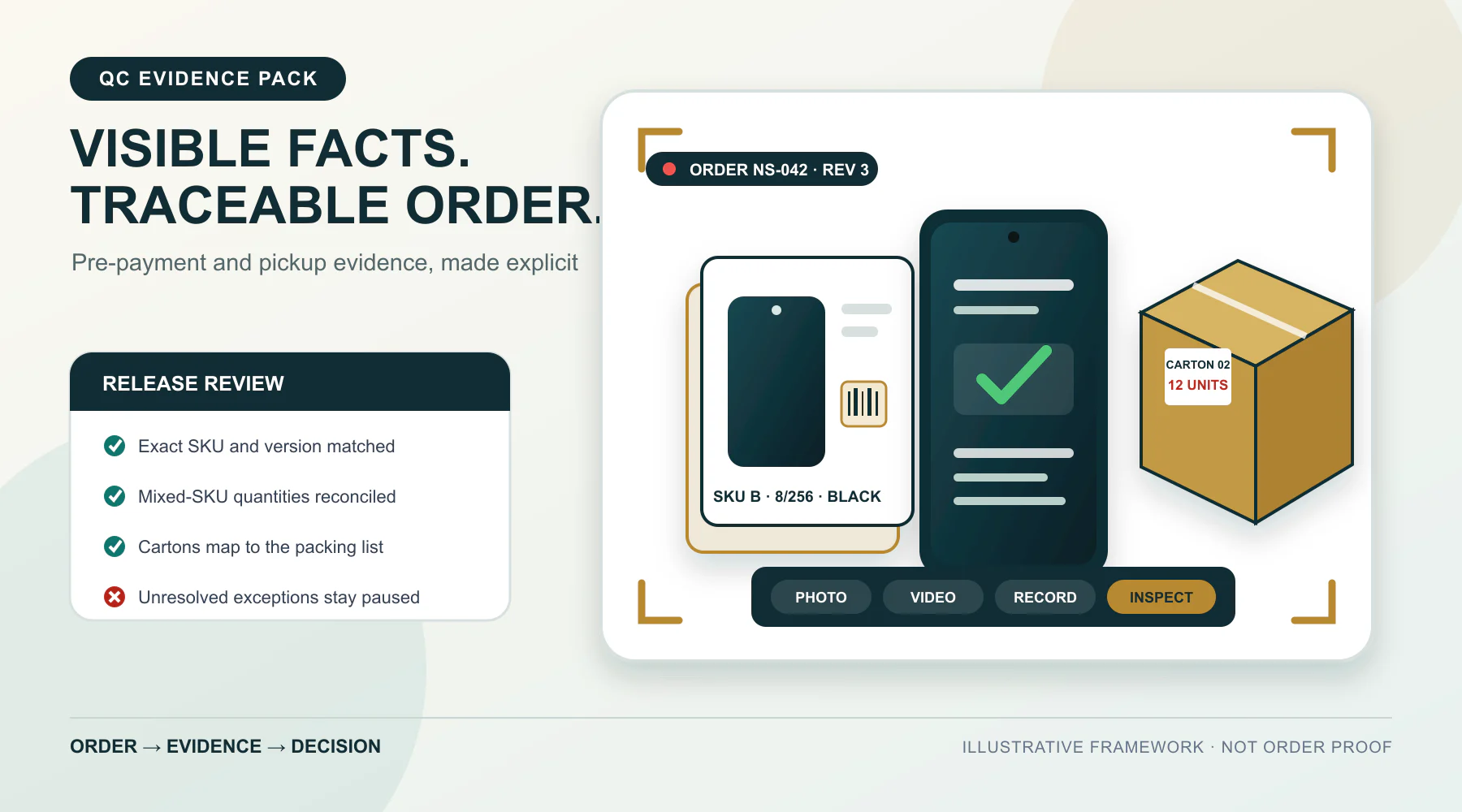
Before the next agreed payment step or warehouse pickup, ask for an evidence pack tied to the order. Generic “quality control (QC) photos” are not enough. The files should connect the latest order sheet to the exact models, versions, quantities, sampled devices, accessories, retail boxes, outer cartons and packing records.
Still photos can document visible labels, condition, grouping and packing facts. They cannot prove authenticity, full functionality, network history, warranty eligibility, legal importability or conformity of every unit. If a claim depends on active operation, box-to-device continuity or batch reconciliation, agree continuous video, structured records or physical inspection for that order. Any next commercial step must follow the contract, request for quotation (RFQ), payment structure, acceptance criteria and status of unresolved exceptions.
Start with the exact models and versions in the current mobile phone wholesale catalog. Apply the evidence checklist to the order sheet, not to a generic product family.
This is a procurement-risk framework. It is not legal, customs, banking, carrier or import advice.
Who this checklist is for
This checklist is for Middle East and North Africa (MENA) phone wholesalers, regional distributors, mobile shop owners, ecommerce sellers and procurement buyers purchasing new Android phones or tablets from China after the main commercial terms are largely agreed.
Supplier due diligence is a separate task. Use the China mobile phone supplier verification guide for that review.
Used devices require their own condition and device-state specification. Use the used iPhone wholesale grading and QC checklist to translate seller grade labels into buyer-defined acceptance fields.
Key Takeaways
- Tie every file to the latest order revision and exact stock-keeping unit (SKU).
- Use photos for visible facts, continuous video for identity and active checks, records for reconciliation, and physical inspection for an agreed scope.
- Reconcile each model, storage option and color separately in a mixed-SKU order.
- Cross-match sampled devices, retail boxes and information screens before drawing a sample-specific conclusion.
- Record every shortage, substitution, damage point and inconsistency as an exception.
- Escalate when the evidence type does not match the commercial claim or order risk.
What to request
For each SKU, request readable box labels, grouped quantities, sampled device information, agreed software screens, box contents, packaging condition, carton labels and a packing-list reconciliation. Say what each file must show. Use continuous video when box-to-device continuity or active operation matters. Quantity and batch questions call for records and an agreed inspection scope. A polished image folder is not a QC result if it leaves the order’s questions unanswered.
Match the evidence type to the claim
A single claim may need more than one type of evidence. The model code may come from a box photo, identity continuity from a continuous video, and the link to the correct order line from a record.
| Evidence type | Best used for | Main limitation |
|---|---|---|
| Still photos | Labels, visible condition, countable groups, box contents and cartons | Do not demonstrate active functions or batch conformity |
| Continuous video | Box-to-device continuity, navigation, startup and agreed basic checks | Usually covers selected units only |
| Records | Order reconciliation, packing lists, identifier maps, test results and exceptions | Must be connected to the physical goods |
| Buyer or third-party physical inspection | Direct observation, physical counts and agreed tests | Supports only the defined inspection scope |
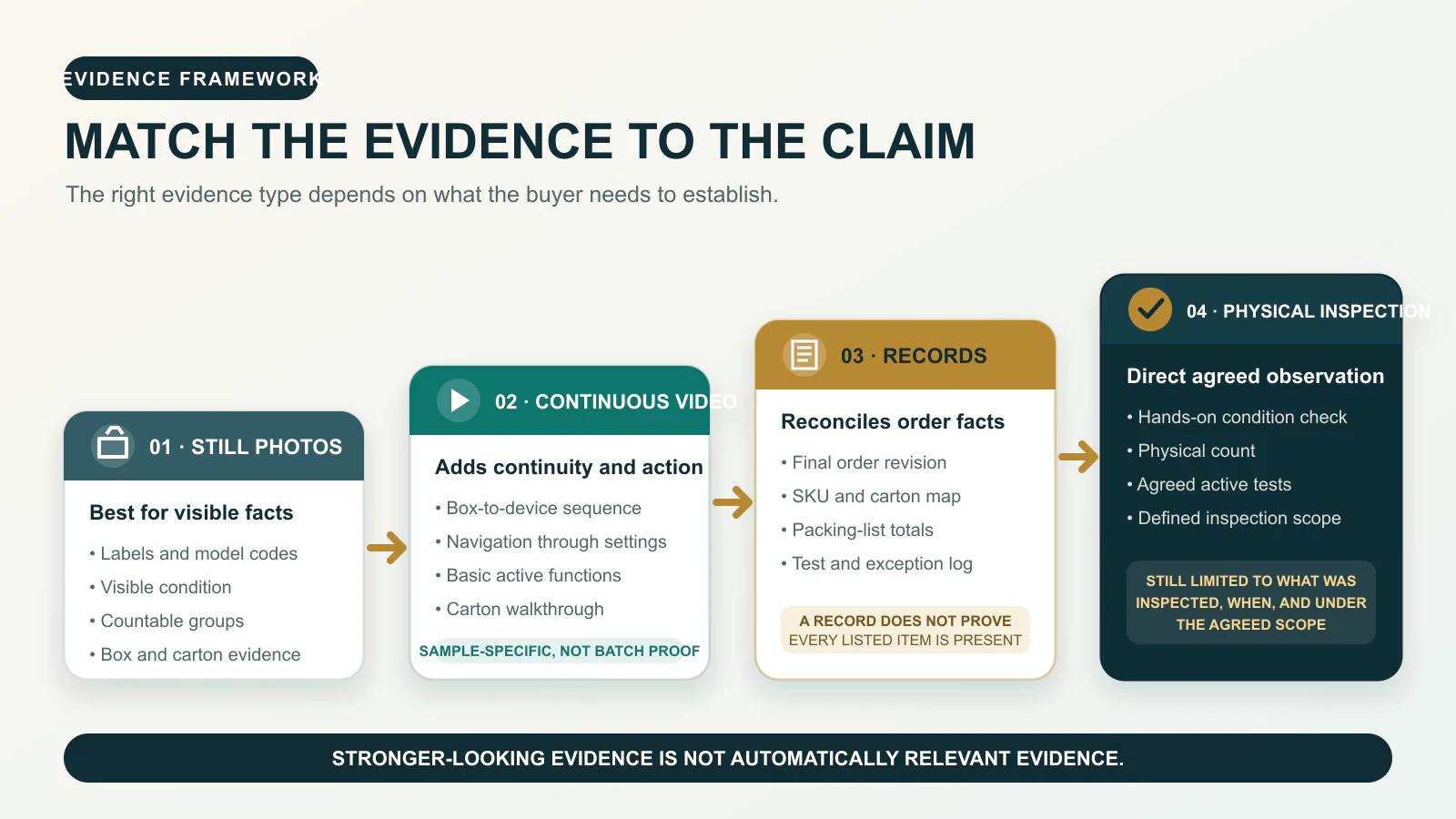
Evidence is useful only when it addresses the claim. Ten box photographs do not demonstrate touchscreen performance. A startup video does not establish conformity of every unit, and a packing list does not prove that every listed item is physically present. Even physical inspection supports only what was checked, when it was checked and under the agreed scope.
Fix the agreed order baseline
Review the evidence against the latest agreed quotation, pro forma invoice, purchase order or order confirmation. Keep its reference and revision date with the review. For each line item, fix the brand, commercial model, manufacturer code where available, version, random-access memory (RAM), storage, color, quantity, included accessories, packaging and agreed software or configuration. List approved substitutions separately.
English menus, Google apps or a familiar product name do not establish the exact regional variant. The global version versus China version guide explains which model-code, software and market markers to require for the order.
Assign each reviewed line one status: matches, accepted exception or unresolved. A newer chat message should not silently replace the controlled order baseline.
Build the evidence pack
Agree the evidence scope before the commercial milestone it is meant to support. The list below describes what a buyer can request. It does not promise that every evidence type or test is available for every order.
1. Tie every file to the current order
Request an evidence index or use consistent file names with the order reference, revision, SKU, carton number where relevant, evidence type and capture date. An order-reference card in the opening image or video frame helps organize the files and reduces accidental reuse. On its own, that card does not prove the capture time or physical location.
Keep discrepancy files separate so a damaged box, conflicting label or substitution is easy to find.
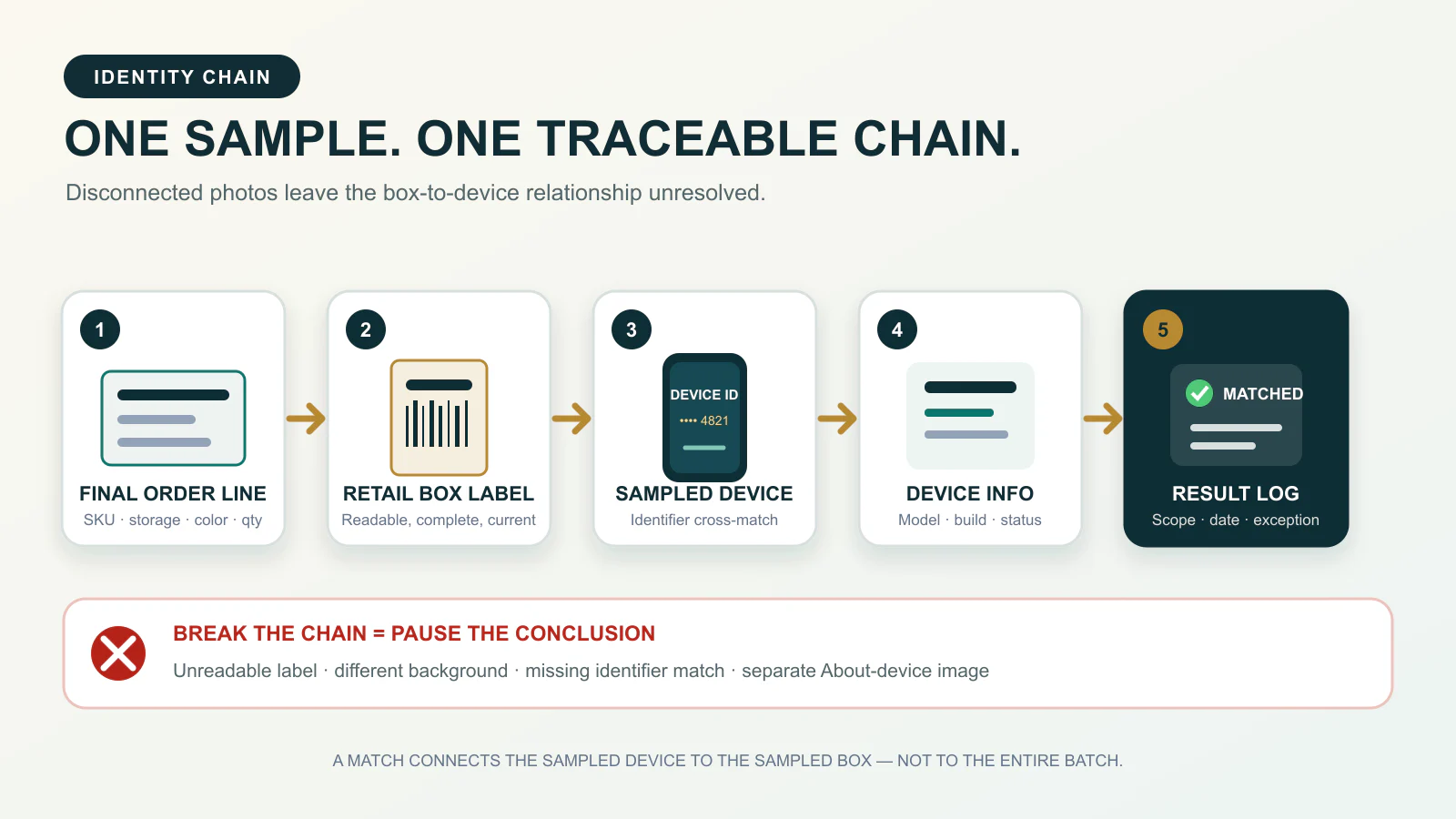
2. Build a sampled-unit identity chain
For each distinct SKU, request readable retail-box labels showing the model code, storage, color and agreed version markers. Then connect the sampled device to that box in this sequence:
- Final order line and revision.
- Retail-box label.
- Device identifier where appropriate.
- Device information screen.
- Recorded result and exception status.
Huawei explains that an International Mobile Equipment Identity (IMEI) can be displayed on a device and may also appear next to the barcode on phone or tablet packaging. Menu paths and label formats vary by brand and model. This is a manufacturer-specific example, not a universal Android procedure. See Huawei’s official identifier guidance.
IMEI is a supporting field, not the main QC test. A separate About-device photograph does not prove that the device belongs to the adjacent box. When that relationship matters, request one continuous box-to-device sequence.
3. Reconcile mixed-SKU quantities
A wide photo is not enough when models, storage capacities or colors are mixed. Request units grouped by exact SKU, a complete view of each group, readable label close-ups, carton numbers and a map for cartons that contain more than one line item.
| Field | Purpose |
|---|---|
| Ordered quantity | Commercial baseline |
| Visibly grouped quantity | What the images appear to show |
| Packed quantity | Packing-record figure |
| Carton allocation | Where the SKU is packed |
| Variance | Shortage, overage or substitution |
| Status | Match, accepted exception or unresolved |
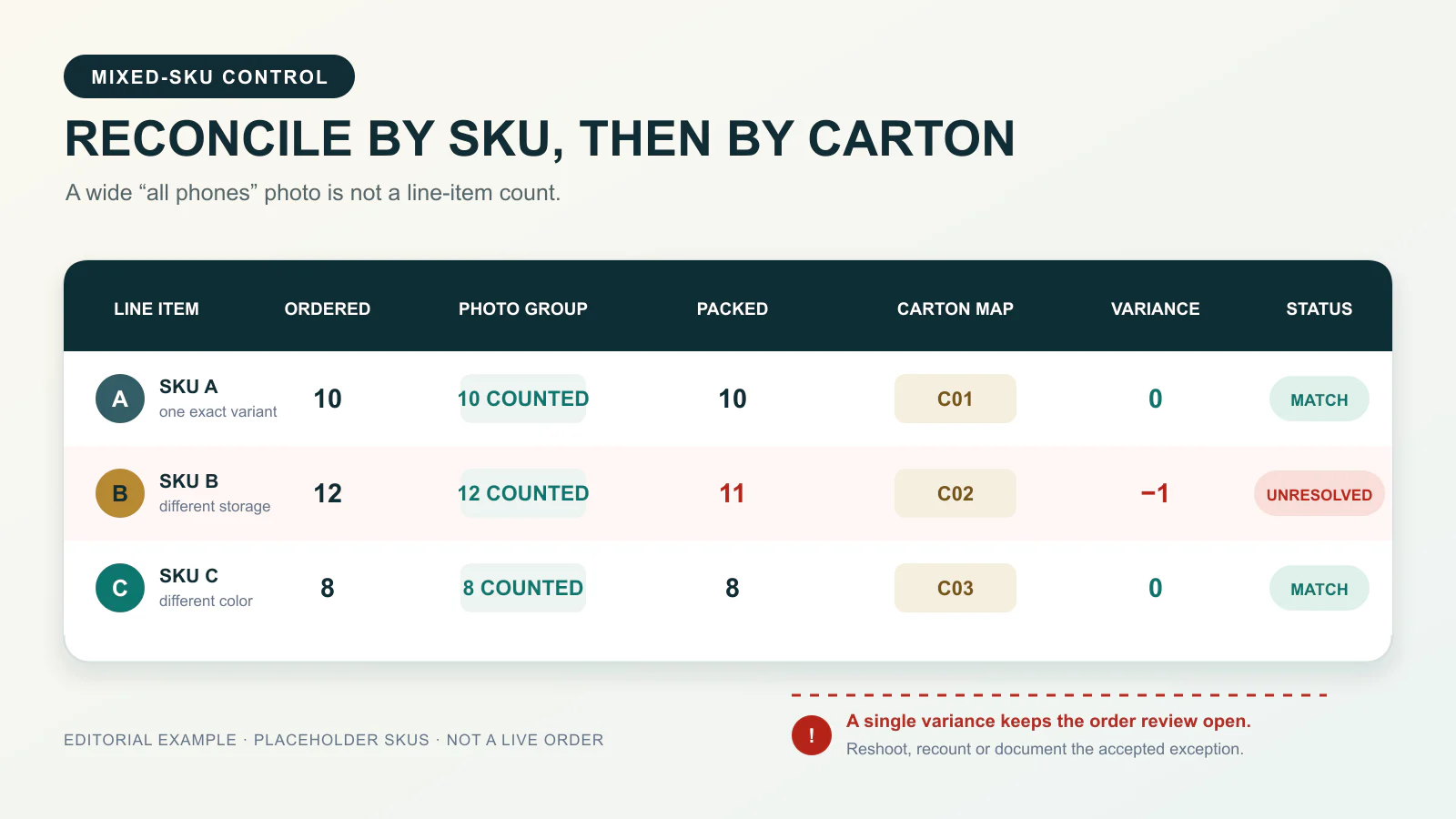
The mixed-SKU wholesale order planning guide explains how to structure these order lines. One photographed device cannot represent the rest of its SKU group. A grouped photograph proves an exact count only when the units are countable and the grouping is clear.
4. Request software and configuration evidence carefully
For a sampled unit, agree the required startup state, display language, model and storage information, Android version or build identifier where commercially relevant, app presence or absence and any approved configuration.
A Play Store icon does not prove Play Protect certification. Google’s official verification path is Google Play Store → profile icon → Settings → About. Google also distinguishes device certification from the Play Protect feature that scans for harmful apps. Follow the official Google Play certification instructions.
When certification status is part of the agreed requirement, connect the screen to the sampled device and box. The result applies to that sample. It does not establish authenticity, carrier compatibility, update duration, warranty eligibility, legal suitability for a destination market or software conformity across the batch.
5. Check included accessories and retail packaging
If sample-box opening has been agreed, request the complete contents and readable labels for promised items. Confirm the plug type, charger or adapter label where relevant, cable and any other included accessory on the order line. Standalone charger and power-bank lines have their own electrical and packaging checks in the charger and power bank wholesale QC checklist.
Record box surfaces, corners, crushing, moisture marks, relabeling and other visible damage. Opening a retail box can affect its presentation, so agree it in advance. An intact-looking seal documents apparent condition only. It does not prove that the box was never opened.
6. Reconcile outer cartons and packing records
Request all outer cartons in a countable sequence with carton numbers, SKU allocation, units per carton and the total carton count. Reconcile the packing list with the latest order and carton map. List every shortage, overage or substitution as an exception. Record dimensions and gross or net weights only if they are part of the agreed documentation.
Packing evidence documents the prepared order. It does not prove later pickup, carrier acceptance, export, customs clearance or destination delivery. The mainland China and Hong Kong handoff guide explains the operational boundary.
What still photographs cannot establish
Photos are useful when the conclusion stays within visible facts. They become misleading when a visible state is used as proof of an active, historical, legal or batch-level claim.
| Claim | Why photos are insufficient |
|---|---|
| Authenticity | Boxes, labels and interfaces can be copied or mismatched |
| Full functionality | A still image records a state, not an active test |
| Every-unit conformity | A photographed sample does not represent uninspected units |
| Unopened history | A seal can appear intact after earlier handling or replacement |
| Network history | Exterior and settings photos do not establish prior activity |
| Warranty eligibility | This depends on separate manufacturer, seller, model and market records |
| Legal importability | Import and regulatory status sit outside a photo-based QC review |
| Battery condition | A percentage or charging icon is not a condition test |
| Play Protect certification | The certification field must be checked in Google Play settings |
| Box-to-device identity | The relationship must be cross-matched |
Photos can still record visible model labels, apparent condition, sampled box contents, countable groups, carton numbering and the state displayed by an identified sample at capture time.
Use continuous video and records for active checks
When basic operation matters, agree a continuous sequence for selected units. Show the order reference, SKU and box label, connect the box to the device, perform only the agreed checks and return the device to the identified box. Possible checks include startup, touch response, front and rear camera operation, charging recognition, speaker playback, microphone recording, SIM detection and agreed sensor behavior.
Read each result narrowly. A charging symbol shows recognition on the tested unit, not battery condition, speed or complete charging performance. A SIM connection covers only the tested device, SIM, network, location and time. It does not establish MENA-wide carrier compatibility. Opening the camera and capturing an image shows basic operation on the sample, not camera quality.
The Android Open Source Project explains that its Compatibility Test Suite Verifier includes tests for functions requiring manual input or positioning, including audio quality, touchscreen, accelerometer and camera behavior. Dynamic functions need active checks. The AOSP CTS Verifier is a developer compatibility tool, not a wholesale QC protocol. An order video is not a CTS test.
Agree which functions matter, how the results will be recorded and what counts as an exception. A sourcing partner does not automatically perform every test for every order.
Escalate when the evidence does not match the risk
A first or high-value transaction may justify stronger evidence. The same applies to many SKU combinations, custom configuration, inconsistent labels, repeated missing evidence, damaged packaging, critical functional requirements or unreconciled quantities.
- Correct or supplement the structured photo pack.
- Add continuous video for identity continuity or active checks.
- Add structured test, packing or exception records.
- Arrange buyer-appointed or separately agreed third-party inspection where justified.
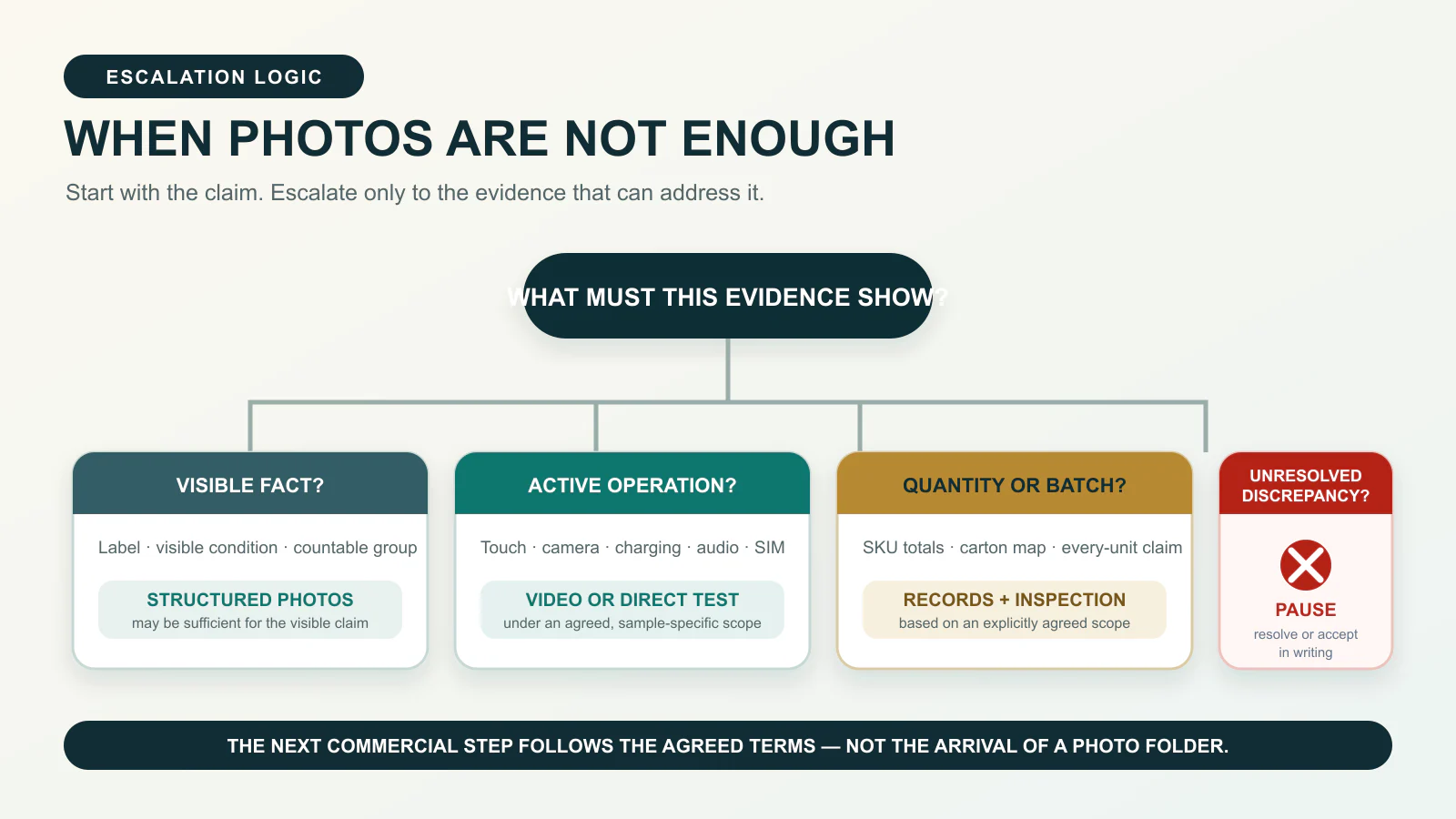
Third-party inspection is an option. It is not a standard NexusSupply service promise or a guarantee of conformity for every unit. Agree its SKU coverage, procedures, access and acceptance criteria for the specific order. There is no universal inspection or sampling percentage.
Complete the evidence review
Before authorizing the next commercial step, work through the evidence against the latest order revision. Confirm that every ordered SKU is represented and that model, version, storage and color evidence match. Cross-match sampled device-to-box relationships where required. Reconcile mixed-SKU quantities across images, records and cartons. Review the agreed software and functional evidence, record packaging and accessory exceptions, and leave every variance as resolved, accepted in writing or unresolved.
A complete-looking image folder does not resolve a material discrepancy. Use the wholesale phone quote comparison guide to keep the evidence tied to the quoted model, version, quantity, inclusions and handoff assumptions.
QC evidence request template
Replace the placeholders and agree the inspection scope before sending this request.
Checklist
- Subject: QC Evidence Request for [Order/RFQ Reference]
- Prepare the evidence pack against order revision [reference/date].
- Provide readable box labels for each SKU, showing the agreed model, configuration, color and version markers where available.
- Provide grouped quantity photos labeled by exact SKU.
- Provide a sampled box-to-device identity sequence where required.
- Show the agreed software or configuration screens.
- Record continuous video checks for [required functions].
- Show sampled box contents only where opening has been agreed.
- Record retail-box condition and visible exceptions.
- Show carton numbers, units per carton and SKU allocation.
- Reconcile ordered quantity, packed quantity and variances on the packing list.
- List shortages, substitutions, damage and unresolved exceptions separately.
- Label files with the order reference, SKU, carton number where relevant, evidence type and capture date.
- Mark every exception as resolved, accepted in writing or unresolved.
How many phones should be photographed?
There is no universal number. Coverage depends on SKU variety, order complexity, value, risk and the agreed inspection method. One photographed unit cannot represent a batch. For broader conformity, agree additional evidence, per-unit records or physical inspection without assuming a standard percentage.
Are sealed-box photos enough for new Android phones?
No. They document visible labels, apparent seal condition and damage, but cannot prove unopened history, matching contents or functionality. Agree sample-box opening beforehand because it can affect retail presentation.
Can an About-device photo confirm a global version?
Not alone. Review the exact model code, software build, box label and agreed market markers together, and connect the screen to the sampled box. English menus, Google apps or a familiar model name are insufficient.
Does a Play Store icon prove Play Protect certification?
No. Check Google Play Store → profile icon → Settings → About. Where relevant, show this inside the sampled-unit sequence. The displayed result applies only to that sample at the check time; it does not prove authenticity or batch conformity.
When should a buyer consider third-party inspection?
Consider it when remote evidence is inadequate for a first, high-value, complex or customized order, or when identity, quantity, packaging or function claims remain inconsistent. Inspection supports only its agreed scope.
RFQ Fields
- Buyer company and destination market
- Exact phone or tablet models
- Required model codes or versions
- RAM, storage, colors and quantity by SKU
- Retail-box contents and accessory requirements
- Software or configuration requirements
- Required photos, continuous video, records or inspection scope
- Sample-box opening restrictions
- Proposed mainland China or Hong Kong handoff point or buyer-arranged pickup plan
- Preferred T/T or L/C arrangement for confirmation
NexusSupply order qualification and handoff
For NexusSupply RFQs, new Android phones and tablets start at 10 units with no per-SKU minimum. Multiple SKUs may be mixed, and the total order value must exceed US$2,000. Accessories require 20 units per SKU. Telegraphic transfer (T/T) or letter of credit (L/C) is confirmed per RFQ. NexusSupply responds to a clear RFQ within 1 business day. Handoff is limited to a buyer-nominated mainland China or Hong Kong address or buyer-arranged UPS/DHL pickup.
These terms do not imply FOB, DDP, customs clearance, onward export, destination delivery or carrier acceptance. Availability and pricing are confirmed through the RFQ, not by the static catalog.
Sources and review date
This guide was reviewed on August 6, 2026. It uses the following official sources for the specific claims linked above:
- Google Play Help: Check and fix Play Protect certification status
- Android Open Source Project: Run CTS Verifier tests
- Huawei Support: How to query the IMEI of a phone or tablet
Submit an order-specific QC evidence request
Submit the NexusSupply RFQ with exact models, version requirements, RAM and storage configurations, colors and quantities by SKU, software or configuration requirements, requested photos, videos, records or inspection, box-opening restrictions and the proposed handoff arrangement. Ask for every exception to be listed against the latest order revision.